

Roles and Permissions in ArcSIP
This article explains the Role-Based Access Control model in ArcSIP and outlines how access, responsibilities, and permissions are structured across different user roles.
ArcSIP strengthens access control and team accountability in three key ways. First, administrators can create role-based access levels that match each user's responsibilities. Second, permissions can be customized for calls, contacts, reports, recordings, billing, and administrative settings.
Role Structure and Responsibilities
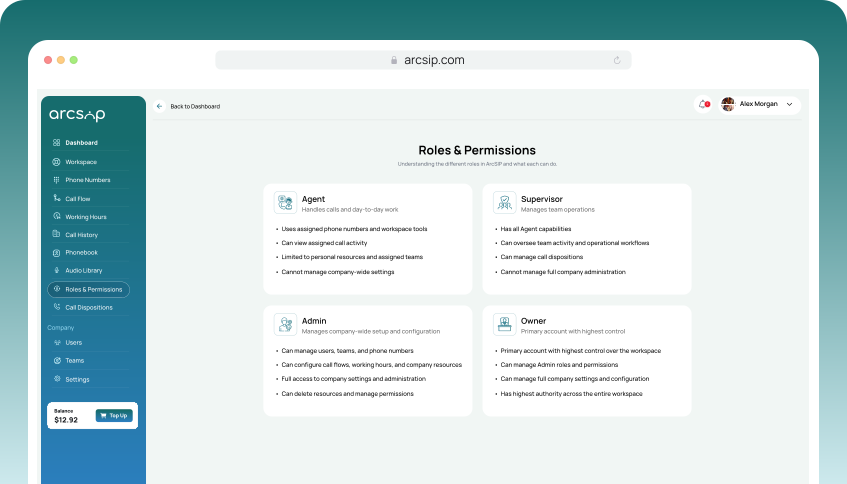
ArcSIP defines four primary roles with clearly defined access scopes, responsibilities, and restrictions.
| Role | Access Scope | Responsibilities | Restrictions |
|---|---|---|---|
| Owner | Platform-Wide Control | The Owner has full control of the ArcSIP platform. This role can manage everything, company settings, billing, users including admin roles, teams, phone numbers, and system configuration. | No restrictions |
| Admin | Organization-Wide Administration | Admins are responsible for managing overall company operations, including supervisors, users, teams, phone numbers, billing, and overall platform setup and control etc. | Cannot create or assign Admin-level roles. |
| Supervisor | Team-Level Operations | Supervisors are responsible for monitoring team-level operations and ensuring service quality within assigned teams. | No access to Owner or Admin-level controls. |
| Agent | Personal-Level Operations | Agents are mainly responsible for handling customer calls within their assigned teams. | Limited to their workspace and personal call activities. |
Role-Based Access Control Matrix
The RBAC matrix defines module and feature-wise access for all roles along with their responsibilities and limitations.
Access Level Legend
Full AccessComplete functional access to all modules and features across the platform.
Partial AccessPartial or limited access based on assigned scope or permissions, such as specific teams, users, numbers, or restricted actions.
Restrict / No AccessNo functional access; feature UI is disabled and not visible to the Role.
| Module | Sub Module / Feature | Owner/Admin | Supervisor | Agent |
|---|---|---|---|---|
| Dashboard | Alert KPIs | All (Teams, Users and Numbers) | Assigned (Teams, Users and Numbers) | Restrict / No Access |
| Live Health | ||||
| Active Calls | ||||
| Users, Teams & Numbers Summaries | ||||
| Users Stats | ||||
| Workspace | KPIs | All (Teams, Users and Numbers) | Assigned (Teams, Users and Numbers) | Assigned Phone Numbers |
| Recent Calls and Voicemails | Assigned Phone Numbers | Assigned Phone Numbers | ||
| Dialer | ||||
| Internal Chat | All (Teams, Users) | Assigned (Teams, Users) | Assigned (Teams, Users) | |
| Phone Number | View and Purchase Number | Full Access | View Only (Assigned Numbers) | View Only (Assigned Numbers) |
| Port In Number & Requests | Restrict / No Access | Restrict / No Access | ||
| CNAM | ||||
| Configure IVR, Team & user based routing, Business hours, Forwarding | ||||
| Number (Assign, Edit, Delete) | ||||
| Call Flow | View, Add, Edit and Delete Call Flow templates | Full Access | Restrict / No Access | Restrict / No Access |
| Working Hours | View, Add, Edit, Delete Working Hours Templates | Full Access | Restrict / No Access | Restrict / No Access |
| Call History | Call & Voicemail History | All (Teams, Users, Numbers) | Assigned (Teams, Users, Numbers) | Assigned Numbers |
| Call Transcription | ||||
| Play Recordings | Restrict / No Access | Restrict / No Access | ||
| Export CSV | Full Access | Restrict / No Access | Restrict / No Access | |
| Phonebook | View/Add/Edit Contacts | Full Access | Full Access | Full Access |
| View Users | All (Teams, Users) | Assigned (Teams, Users) | Assigned (Teams, Users) | |
| View Teams | ||||
| Bulk Upload | Full Access | Restrict / No Access | Restrict / No Access | |
| Audio Library | Upload/Preview/Edit/Delete Audio | Full Access | Full Access | Restrict / No Access |
| Roles & Permissions | View Roles & Permissions | Full Access | Restrict / No Access | Restrict / No Access |
| Call Dispositions | View, Edit, Delete, Add Dispositions | Full Access | Restrict / No Access | Restrict / No Access |
| Users | View, Add, Invite, Resend Invite, Delete Users | Full Access | Restrict / No Access | Restrict / No Access |
| Teams | View, Add, Edit, Delete Teams, Assign/Unassign Users | Full Access | Restrict / No Access | Restrict / No Access |
| General | Update Company Information | Full Access | Restrict / No Access | Restrict / No Access |
| Plan | Manage Subscription Plans and Users | Full Access | Restrict / No Access | Restrict / No Access |
| Billing | Manage Invoices & Payment Methods | Full Access | Restrict / No Access | Restrict / No Access |
| Security | Change Password | Full Access | Restrict / No Access | Restrict / No Access |
| Top Up | Balance & Auto Top Up | Full Access | Restrict / No Access | Restrict / No Access |
Owner is the highest-level role and can manage Admins. Admin has similar permissions but cannot manage Admin roles.